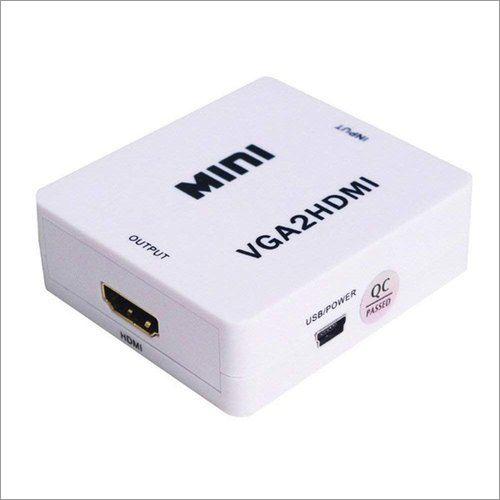
About VGA2 HDMI Converter
Holding thorough knowledge and client centric approach, we are considered as the trusted trader and supplier of various types of gadgets. Here our firm is providing VGA2 HDMI Converter changes over PC VGA and sound into HDMI, permitting association of PC to 1080p HDTV. This item has high data transmission capacity support 1920x1080 at 60Hz to converter. It is superb in performance, high quality and durable nature. The provided VGA2 HDMI Converter is excellent in performance, high in quality and durability.
| Brand |
Imported |
| Part Number |
mini |
| Converter type |
HDMI |
| Usage/Application |
CCTV |
| Model Number |
VGA2HDMI |
| Color |
White |
Effortless Conversion and SetupTurn your VGA and analog audio outputs into modern HDMI with a single, easy-to-use device. This converter offers smooth, plug-and-play operation with no need for driver installation. Simply connect your legacy VGA device, attach the included USB power and audio cables, and you'll be ready to enjoy high-definition video and audio on your HDMI-equipped monitor or TV.
Full HD Performance and Broad CompatibilityExperience resolutions up to 1920x1080 for sharp, vibrant visuals suitable for CCTV monitoring, business presentations, or home entertainment. This converter supports all standard VGA resolutions and outputs integrated stereo sound. Its sturdy metal construction promises reliable performance, whether used at home, in offices, or CCTV setups.
FAQ's of VGA2 HDMI Converter:
Q: How do I set up the VGA to HDMI Converter?
A: Simply connect your VGA source (such as a computer or DVR) to the converter's VGA input. Plug the 3.5mm audio cable into your source and the converter. Attach the USB power cable to any DC 5V USB port and then connect the HDMI output to your display. No drivers or software installation is needed.
Q: What devices are compatible with this VGA to HDMI converter?
A: Any device equipped with a VGA video output and a 3.5mm audio port can connect to this converter-common examples include desktop PCs, older laptops, and DVRs. The HDMI output works with modern TVs, monitors, and projectors.
Q: When should I use this converter instead of a standard cable?
A: Use this converter when you need to connect a VGA-only device to an HDMI-only display. Standard cables will not work for this signal conversion, as VGA and HDMI are fundamentally different interfaces; this converter bridges that gap.
Q: Where can this converter be typically applied?
A: This model is especially useful in offices, classrooms, surveillance (CCTV) systems, and homes to integrate older computing or security infrastructure with modern HDMI displays.
Q: What audio formats does the converter support?
A: The converter supports integrated analog stereo audio (left/right) via the 3.5mm input, effectively transmitting both video and audio to the HDMI display.
Q: Does the converter require external power, and how is it supplied?
A: Yes, the converter requires external power, provided via the included USB cable. Connect the USB to any DC 5V USB power source such as a computer port or USB adapter.
Q: What are the benefits of using this VGA to HDMI converter?
A: This converter allows you to extend the lifespan of legacy devices, ensuring compatibility with modern displays while providing high-definition video and stereo audio output. Its easy installation and universal application make it a practical upgrade solution.

 Send Inquiry


 Send Inquiry

 Send Inquiry