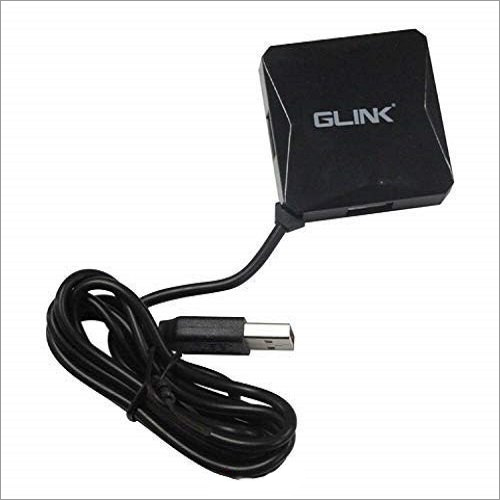
About Glink 4 Port 2.0 USB Hub With 120 Cm Cable
Introducing a wide scope of good quality item has given us the skill to make them in an ideal manner. In a similar path, we are offering acceptable quality Glink 4 Port 2.0 USB Hub With 120 Cm Cable that turn out great with low-fueled gadgets like mice and consoles. This item is work with powerful gadgets like webcams and glimmer drives. It utilizes a daisy-chain model to interface and access different gadgets in the chain.
| Model Name/Number |
GLink |
| Brand |
GLink |
| Number Of Ports Pins |
4 |
| Network Type |
USB HUB |
| Features |
USB HUB |
| Usage/Application |
PC |
| Dimensions |
120cm |
| Product Code |
HUB |
| Size/Dimension |
120cm |
| Country of Origin |
Made in India |
Versatile ConnectivityExpand your workspace by connecting up to four USB devices simultaneously with the Glink 4 Port USB 2.0 Hub. Its broad compatibility makes it suitable for PCs and laptops, ensuring hassle-free data transfers and peripheral connections.
Extended Reach and Durable BuildThe generous 120 cm cable offers exceptional flexibility, allowing you to position the hub conveniently even in larger setups. Its plastic construction guarantees lightweight durability, making it easy to transport and set up wherever needed.
Effortless InstallationNo complicated setups or drivers are required. Simply plug the Glink USB hub into your computer's USB port, and it's ready for instant use, boosting your productivity by supporting multiple devices simultaneously.
FAQ's of Glink 4 Port 2.0 USB Hub With 120 Cm Cable:
Q: How do I use the Glink 4 Port 2.0 USB Hub with my laptop or PC?
A: Simply connect the USB hub to an available USB port on your laptop or PC using the built-in 120 cm cable. Plug your devices, such as flash drives or keyboards, into any of the four available USB ports, and your computer will detect them automatically.
Q: What devices are compatible with this USB hub?
A: The Glink 4 Port USB Hub is compatible with most USB-enabled devices, including keyboards, mice, external storage drives, printers, and more. It works seamlessly with both PCs and laptops.
Q: When should I consider using a USB hub like this one?
A: A USB hub is ideal when you need to connect multiple USB devices but have limited ports on your computer. It's particularly useful in office setups, home workstations, and during travel.
Q: Where can I place the hub for best performance?
A: Thanks to its extra-long 120 cm cable, you can place the hub on your desk, next to your laptop or PC, or even further away for easier access to your devices. This allows greater flexibility in organizing your workspace.
Q: What is the process for installing the Glink USB hub?
A: Installation is straightforward. There are no drivers or special software required. Insert the USB connector into your computer, and you're ready to connect your devices instantly.
Q: What benefits does the Glink 4 Port USB hub provide?
A: This hub allows you to connect up to four devices simultaneously while maintaining a clutter-free workspace, thanks to its compact design and long cable. It also ensures stable data transfer and efficient organization of your peripherals.

 Send Inquiry


 Send Inquiry

 Send Inquiry