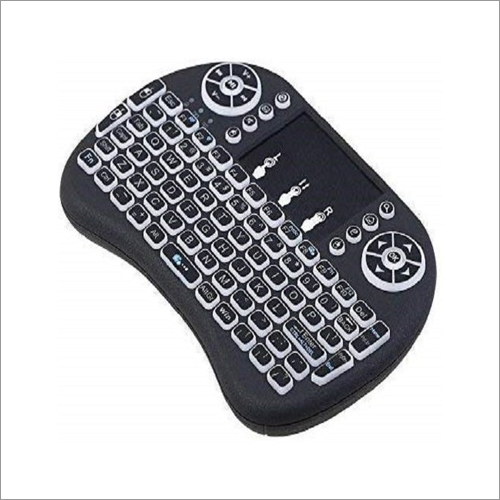
About 7 Backlights Mini Glink Keyboard Mouse
Adapting up to the demand has driven us to supply this 7 Backlights Mini Glink Keyboard Mouse that offers better network while the minimal and space-saving plan empowers the console and mouse to be obliged without any problem. This item is appreciated in the market because of its comfortable use, light weight and durable nature. All the provided items are properly checked on the various quality parameters before dispatching them from our premises. We offer this Keyboard Mouse within the promised time frame.
| Key Numbers |
Mini Keyboard Mouse |
| Model Name/Number |
Glink |
Vivid RGB Backlight FunctionalityEnjoy a vibrant typing and navigation experience with seven adjustable RGB backlight options on the keyboard. Easily switch between different lighting modes to suit your mood or environment, enhancing visibility and aesthetics during day or nighttime use.
Ergonomic and Silent OperationBoth the keyboard and mouse are ergonomically designed for comfortable use during long hours. Quiet keys and mouse clicks ensure a distraction-free workspace, making this set ideal for shared environments or late-night productivity.
Effortless Wireless ConnectivityWith 2.4GHz wireless technology, simply plug the USB receiver into your device and get started instantly-no drivers required. The stable connection works across multiple operating systems, supporting seamless transitions between devices at distances up to 10 meters.
FAQ's of 7 Backlights Mini Glink Keyboard Mouse:
Q: How do I set up the Glink keyboard and mouse combo for first-time use?
A: Simply insert the included USB wireless receiver into your device's USB port. Install the required AAA batteries in the keyboard and AA battery in the mouse (not included). The devices will connect automatically; no additional drivers or setup are needed.
Q: What are the benefits of using the adjustable RGB backlights?
A: The seven adjustable RGB backlights improve visibility in low-light conditions, enhance the visual appeal of your workspace, and allow customization to match your personal preferences or mood.
Q: When should I adjust the mouse DPI settings, and how does it affect usage?
A: Change the mouse DPI settings (800/1200/1600 DPI) based on your needs. Lower DPI is ideal for precision tasks like editing, while higher DPI suits rapid navigation or gaming. Adjust with the button on the mouse for instant sensitivity changes.
Q: Where can I use the keyboard and mouse set?
A: This set is compatible with Windows, Mac OS, Android, and Linux systems, making it suitable for use with most PCs, laptops, and supported smart devices at home, in the office, or on the go.
Q: What is the process for replacing the batteries in these devices?
A: To replace batteries, open the battery compartment on the underside of each device. The keyboard requires two AAA batteries, while the mouse uses one AA battery. Insert fresh batteries according to the indicated polarity and close the compartment.
Q: How does the plug and play feature simplify usage?
A: The plug and play feature allows you to use the keyboard and mouse instantly-just connect the USB receiver. No need to install drivers or software, which speeds up setup and avoids technical complications.
Q: What makes the Glink keyboard and mouse suitable for extended work sessions?
A: Both devices boast ergonomic designs and silent operation. The keyboard's silent keys and the mouse's quiet click help reduce fatigue and distractions, making them excellent choices for long working hours or shared environments.

 Send Inquiry


 Send Inquiry

 Send Inquiry